MobiFlight - Variable
The MobiFlight - Variable action type sets a MobiFlight variable when triggered. This action type is often used to set variables used in preconditions for other input configurations, for example when using a single encoder to tune radio frequencies.
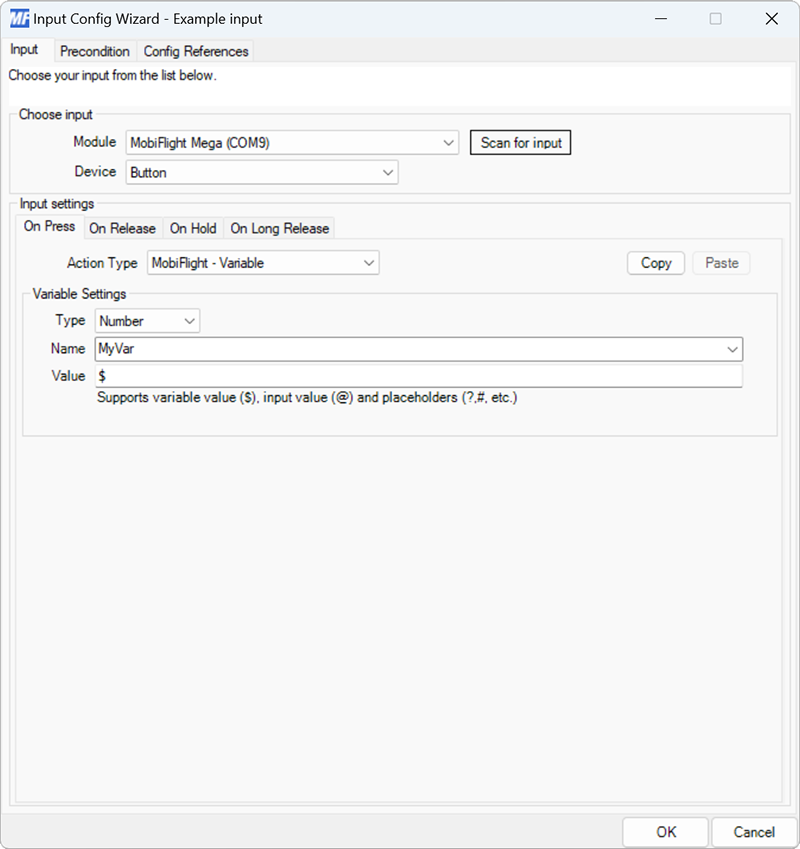
| Setting | Description |
|---|---|
| Use existing variable | Displays a list of existing MobiFlight variables to use. |
| Type | The type of data stored by the variable, either Number or String. |
| Name | The name for the variable, used when referencing the variable in other configurations. |
| Value | Specifies the value to set the variable to. Supports value modification with NCalc. |
To create a new variable select the type, enter a name, and an expression. To use an existing variable select it from the dropdown.
Tip
To view the current value of a variable, create an output configuration that displays the variable, then look at the Output Value column in the main MobiFlight window.